
Tips to use Gantt chart
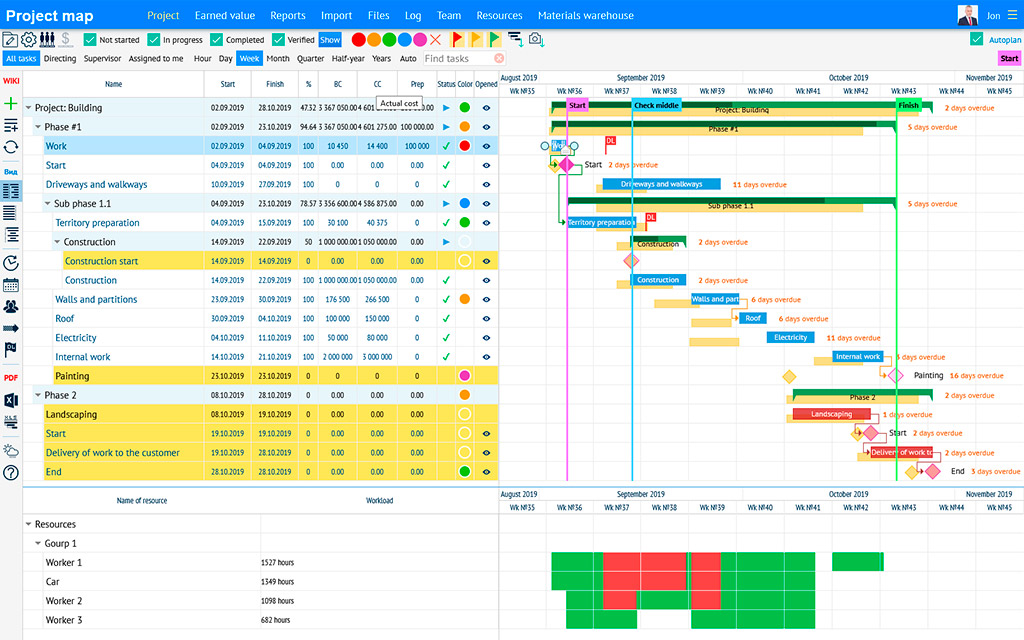
Gantt chart is a type of bar chart used to show the progress of a construction project over time. It is commonly used to track project progress, identify potential problems, and plan future tasks. The chart includes a timeline, tasks, and how long each task is expected to take. The chart is also often used to compare actual progress to the planned timeline.
-
Identify project milestones and tasks: When identifying milestones and tasks for the project, it is important to break them down into manageable parts. This can help you to stay organized and focused on achieving each individual milestone. For example, a milestone for a construction project could be the completion of the foundation, and the tasks required to achieve this milestone could include site preparation, excavation, and concrete pouring.
-
Estimate time frames: When estimating time frames for each task and milestone, it is important to consider the complexity of the task and the resources required to complete it. You should also factor in potential risks and uncertainties, such as inclement weather or delays in the delivery of materials. This can help you to avoid overpromising and underdelivering, which can damage your reputation and relationships with stakeholders.
-
Track progress and update the Gantt chart: Regularly tracking progress and updating the Gantt chart can help you to identify potential issues and take corrective action as needed. It is important to establish a regular cadence for progress updates, such as weekly or biweekly meetings with the project team. During these meetings, you can review the status of each task, identify any delays or roadblocks, and discuss potential solutions.
-
Add buffers to the timeline: Adding buffers to the timeline can help you to account for unexpected delays and changes in the timeline. A buffer is an additional amount of time added to a task or milestone to provide a cushion in case of unexpected delays. For example, if a task is estimated to take two weeks to complete, you could add a buffer of two days to account for any potential delays.
-
Include dates for reviews and feedback: Including dates for reviews and feedback in the Gantt chart can help you to stay on track and ensure that the project is meeting deadlines. For example, you could schedule regular reviews with stakeholders to review the progress of the project and provide feedback on any areas that need improvement.
-
Add resources to the Gantt chart: Including resources in the Gantt chart can help you to keep track of the people, equipment, and materials required for each task. This can help you to avoid overbooking resources and ensure that you have the necessary resources available when you need them. For example, if you know that a particular task requires a specialized piece of equipment, you can schedule that equipment in advance to ensure that it is available when you need it.
-
Utilize software: Utilizing project management software and online tools can help you to create and manage Gantt charts more efficiently. For example, software tools such as Microsoft Project and Asana can help you to track progress, assign tasks, and collaborate with team members in real-time. These tools can also help you to generate reports and analyze project data, which can be useful for identifying trends and areas for improvement.
Overall, effective construction project management requires careful planning, regular communication, and the ability to adapt to changing circumstances. By following these tips and best practices, you can help to ensure the success of your construction project and build stronger relationships with your stakeholders.