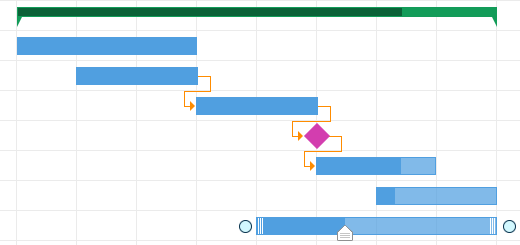
Description of types of tasks
The following types of tasks are used in the project manager:
- Phase
- Task
- Milestone
Phase ( or Stage, or summary task )
Features of phases
Phases of work consist of simple tasks and milestones. The main purpose is to combine works of the same type into one group. Like folders in MS Windows.
Phases do not have their planned and actual execution dates, you cannot set them yourself. The dates are automatically calculated and set based on the dates set in the subtasks.
This rule also applies to costs, resources and materials.
Costs (planned, actual or other) of the work stage are the sum of the costs (planned, actual or other) of all subtasks of a specific stage of work.
Limitations
You cannot establish connections between stages.
Summary information about the scope of work is not displayed in the stage data. For the reason that the volumes of different works in the stage can be taken into account in different units (%, m2, m3, kg ...).
Task (the same simple operation, work, job)
Features of tasks
The task describes one specific work that is performed within the framework of the project. Like files in MS Windows.
Task attributes:
- % completion (progress)
- dates
- values
- volumes
- responsible for work
- contractor
- type of payment for work performed
- possibility of fixing duration or labor costs
- resources and materials required to perform the work
For tasks, it is possible to establish connections with other tasks.
Milestone (a.k.a. control event (CS))
Features of milestones
CS has only a start date, no end date. It is possible to consider that the date of the beginning and end of the CS are equal.
For CS, there is an opportunity to establish connections with other tasks.
For milestones, you can specify:
- % completion (progress)
- dates
- volumes
- values
- responsible
Limitations
At the milestone, it is not possible to assign resources and specify the materials used.
It is not possible to view the report "Graphic of mastered volumes"
It is not possible to specify a contractor.
There is an opportunity for all types of tasks:
- commenting
- will be attached files
- view the activity log
- view reports: "Plan-schedule", "Financial schedule", "Development analysis"
- create arbitrary user data fields
- keep a diary
- work with defects
Visual designation
The stage on the diagram is displayed with a green bar
Simple task - blue stripe
The milestone is a purple rhombus